
Dynamic Color Init
Make the color reflect the scheme

When you start a new app from scratch, the SwiftUI versus UIKit discussion is usually framed around productivity, navigation, animation, and team preference. But taking over a legacy app is a different problem.
At that point, UIKit is often already deep in the architecture. Screens may be hosted in UIKit and partially rebuilt with SwiftUI. Small pieces of the design system can become interchangeable between the two worlds. And that is where the decision becomes less theoretical: not every design-system primitive behaves equally well when it crosses the framework boundary.
For me, color is the clearest example.
Font and color may both look like simple shared design tokens, but they do not play the same role in a real product. Fonts are usually much more stable. Tying typography changes to color scheme is rarely a good default and can damage consistency. Color is different. Light and dark appearance are real runtime states, and if color does not adapt correctly, the UI breaks immediately.
That is the practical distinction: in a mixed UIKit and SwiftUI codebase, dynamic color support is not a nice-to-have. It is the part that keeps the interface usable.
Why Color Matters
In a design system, both font and color are reused everywhere. But only one of them is expected to react constantly to appearance changes.
If a font token stays the same in light and dark mode, that is usually fine. In many apps, it is exactly what you want.
If a color token stays the same when the interface moves between light and dark appearance, that is often a bug.
And it becomes a very visible bug. Contrast drops, surfaces blend together, hierarchy disappears, and the interface can become uncomfortable or unreadable fast.
That is why the more useful question in a legacy mixed project is often not:
Should this screen be SwiftUI or UIKit?
But this:
Does this design-system primitive adapt correctly in both?
UIKit Dynamic Colors
UIKit supports dynamic colors directly. Apple documents UIColor(init(dynamicProvider:)) as an initializer that uses a block to determine the appropriate color values based on the specified traits. Apple’s color-creation docs also describe creating colors dynamically based on the currently active traits.
That means UIKit is not limited to static colors hard-coded for one appearance. You can define a color once and let it resolve differently for light and dark mode.
import UIKit

enum DSColor {
    static let background = UIColor { traits in
        traits.userInterfaceStyle == .dark
        ? UIColor.black
        : UIColor.white
    }

    static let primaryText = UIColor { traits in
        traits.userInterfaceStyle == .dark
        ? UIColor.white
        : UIColor.black
    }
}
This is the right starting point for a legacy UIKit-heavy design system. If your tokens are still fixed values, the problem is usually not the framework choice. The problem is that the tokens are not appearance-aware yet.
Keep in mind: color created like this is relying on traits at the moment of a call. It’s not dynamically changes with any traits changes!
Foreground And Traits
If the app returns from background and the relevant traits changed while it was away, for example the system appearance switched between light and dark, UIKit can resolve the dynamic color against the new traits. Apple’s docs frame dynamic colors around active traits, and UIKit provides explicit trait observation APIs for responding when observed traits change.
So the real trigger is not “app became active.” The real trigger is “the trait environment changed.”
In practice, that is exactly what you want to model in a design system anyway. How to achieve that?
Trait Changes In UIKit
If you need to run your own update logic when appearance changes, UIKit now provides trait observation through UITraitChangeObservable.registerForTraitChanges. Apple documents it as registering a list of traits to observe and a closure to execute when one of those traits changes, and the API is available starting in iOS 17.
import UIKit

final class ProfileViewController: UIViewController {
    private var registration: UITraitChangeRegistration?

    override func viewDidLoad() {
        super.viewDidLoad()

        registration = registerForTraitChanges([
            UITraitUserInterfaceStyle.self
        ]) { (self: Self, _) in
            self.applyColors()
        }

        // You can also observe other traits here when needed,
        // not only interface style.

        applyColors()
    }

    private func applyColors() {
        view.backgroundColor = DSColor.background
    }
}
This is useful when your colors are consumed indirectly, composed into custom layers, or affect logic beyond just assigning a UIColor to a standard UIKit property.
We are closing 2 gaps:
- Correct color creation based on traits
- Track changes and relatively update it
SwiftUI And Color
SwiftUI approaches the same problem from the environment side.
Apple documents EnvironmentValues.colorScheme as the environment value you read to find out whether SwiftUI is currently displaying a view using .light or .dark. Apple also documents Color as resolving to a concrete value just before use in a given environment, which is what enables context-dependent appearance.
That means SwiftUI is already built around the assumption that appearance is environmental and reactive.
import SwiftUI

struct DynamicColorView: View {
    @Environment(\.colorScheme) private var colorScheme

        var body: some View {
            VStack {
                Text(colorScheme == .dark ? "Dark" : "Light")
                    .font(.largeTitle)
                    .foregroundStyle(Color("title"))
            }
            .frame(maxWidth: .infinity, maxHeight: .infinity)
            .background(colorScheme == .dark ? .black : .white)
        }
}
Gladly, now in Xcode 27 we can see both color appearances:
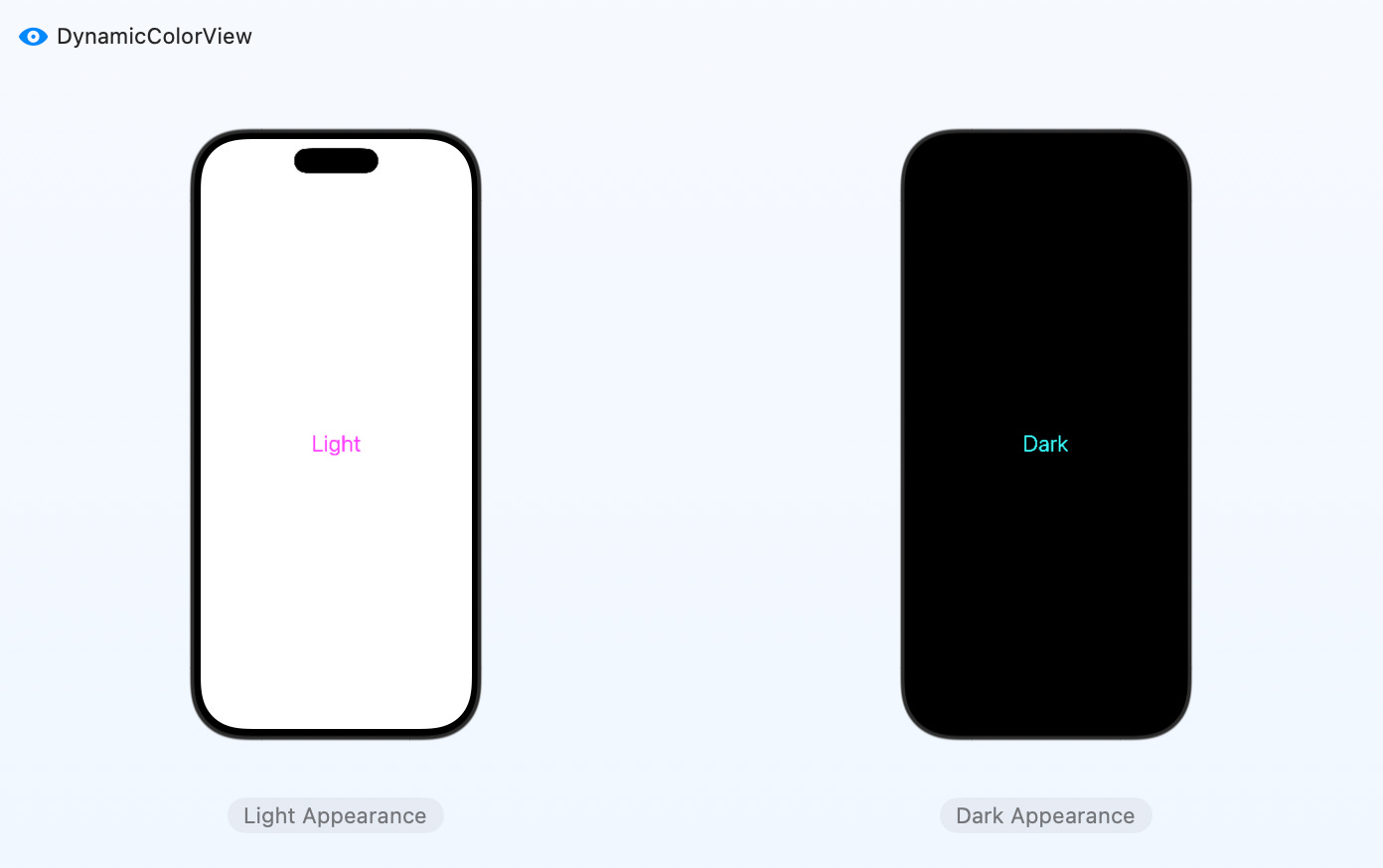
You do not usually ask SwiftUI to manually redraw for this. The environment changes, the view recalculates, and the color resolves again in the new context. Apple’s docs make that model pretty explicit.
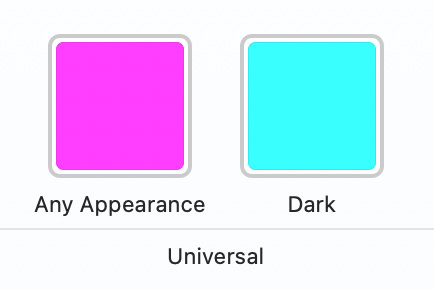
I’ve just declared Color in Assets, and it works:
Legacy Project Reality
This is where the “SwiftUI or UIKit?” question gets reframed.
In a legacy UIKit-heavy codebase, choosing UIKit for a screen is not automatically a problem. Choosing SwiftUI for a new piece is not automatically a problem either.
The real risk is pretending the design-system layer is neutral when it is not.
Some primitives cross the boundary cleanly. Some do not.
Color is one of the primitives that must stay dynamic, because both UIKit and SwiftUI already have appearance-aware models for it. If your design system exposes color as static values only, the UI will drift or break in one of the frameworks sooner rather than later.
Font is a different story. Typography is often far less dynamic and much more identity-driven. Most of the time, mapping font tokens consistently across UIKit and SwiftUI is enough. Trying to vary fonts by color scheme usually adds noise instead of improving UX.
Design System Takeaway
If UIKit is already deep in the app, you do not always need to “win” the framework argument first.
A more useful first step is to ask:
Which tokens must remain reactive across both frameworks?
Which tokens should stay stable regardless of appearance?
Which ones break UX immediately if they do not adapt?
Color lands in the first group.
That is the part worth solving early, because once light and dark mode stop behaving consistently, the product feels broken no matter how modern the view layer looks.
Is Migration Worth It
In a legacy project, the right choice between SwiftUI and UIKit is often less about ideology and more about where the architecture already lives.
If UIKit is still the structural core, that is fine. The more important thing is whether the pieces you share between UIKit and SwiftUI preserve the behaviors users already expect.
And for a design system, dynamic color support is one of the most important of those behaviors.
UIKit already gives you dynamic colors through UIColor(dynamicProvider:). SwiftUI already gives you environment-driven appearance updates through colorScheme and context-resolved Color. So the real job is not inventing a third model. It is making sure your design-system colors stay dynamic no matter which UI layer consumes them. That is what keeps the UI working when appearance changes, including after the app returns and the trait environment has changed.
References
Apple Developer Documentation: UIColor(init(dynamicProvider:))
Apple Developer Documentation: Color creation
Apple Developer Documentation: registerForTraitChanges(_:handler:)
Apple Developer Documentation: EnvironmentValues.colorScheme
Apple Developer Documentation: Color
Apple Developer Documentation: EnvironmentValues