

Apple has always had a close relationship with music. It started with the sensational iPod, a digital music player with its iconic Click Wheel. Then came the iPod touch, which looked like an iPhone but was, first and foremost, a beautiful music player. The list goes on with AirPods and Apple Music.
Music has always been an important part of Apple’s ecosystem. And developers, of course, have always wanted APIs to bring music experiences into their own apps.
This year, Apple has taken a significant step forward by introducing a new framework to replace an approach dating back to iOS 5. Remember MPNowPlayingInfoCenter and MPRemoteCommandCenter? They’ve been handling playback metadata and remote controls for years.
Now, there’s a new way to manage all of that.
Meet the Now Playing framework in iOS 27! 🎵
I’ll keep naming like this since it’s the Framework name. Just sounds pretty natural.
A Podcast Player
To show how it works it obvious that we need a music player. Once, many decades ago I’ve been working with Podcasts and it’s a perfect moment to make a Podcast player )
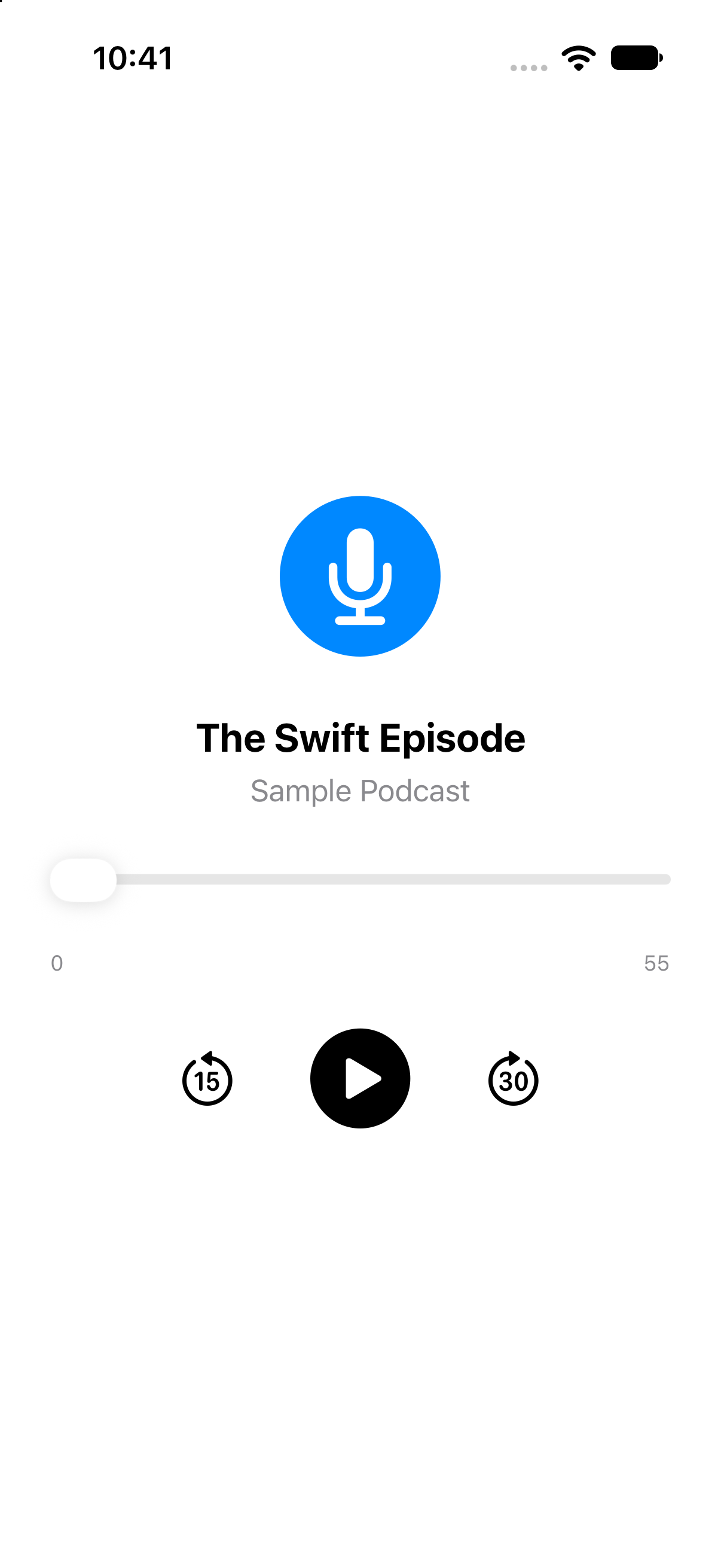
It’s is a good example because Now Playing is not only metadata. The system also needs an accurate playback position and commands such as seeking and skipping 15 or 30 seconds.
The core model can remain the same model that owns the actual player:
import AVFoundation
@preconcurrency import NowPlaying
import Observation

@available(iOS 27.0, *)
@MainActor
@Observable
final class PodcastPlayer: @MainActor MediaSessionRepresentable {

    //Our Media data
    struct Episode {
        let id: String
        let title: String
        let show: String
        let duration: TimeInterval
        let resourceName: String
        let resourceExtension: String
    }

    let id = "podcast-session"
    let episode: Episode

    private let player: AVPlayer
    private var session: MediaSession<PodcastPlayer>?
    @ObservationIgnored
    nonisolated(unsafe) private var periodicObserver: Any?
    @ObservationIgnored
    nonisolated(unsafe) private var didFinishObserver: NSObjectProtocol?

    private(set) var isPlaying = false
    private(set) var elapsedTime: TimeInterval = 0

    init(episode: Episode) {
        self.episode = episode

        guard let url = Bundle.main.url(
            forResource: episode.resourceName,
            withExtension: episode.resourceExtension
        ) else {
            fatalError("Missing bundled audio resource")
        }

        player = AVPlayer(url: url)

        periodicObserver = player.addPeriodicTimeObserver(
            forInterval: CMTime(seconds: 0.5, preferredTimescale: 600),
            queue: .main
        ) { [weak self] time in
            MainActor.assumeIsolated {
                guard let self else { return }
                let seconds = time.seconds
                if seconds.isFinite {
                    self.elapsedTime = seconds
                }
            }
        }

        didFinishObserver = NotificationCenter.default.addObserver(
            forName: .AVPlayerItemDidPlayToEndTime,
            object: player.currentItem,
            queue: .main
        ) { [weak self] _ in
            MainActor.assumeIsolated {
                self?.isPlaying = false
            }
        }
    }
}
I’m supporting Swift 6.2 and Strict Concurrency
There is no separate “Now Playing state” object here. The same model that controls playback also describes it to the system.
Describing the Content
MediaSessionRepresentable.content replaces the dictionary-style metadata publishing most of us know from MPNowPlayingInfoCenter. More importantly, the framework understands what kind of media you are publishing.
For a podcast we can return PodcastContent:
var content: (any MediaContentRepresentable)? {
    PodcastContent(
        id: episode.id,
        episodeTitle: episode.title,
        showName: episode.show,
        releaseDate: nil,
        type: .audio,
        duration: .finite(episode.duration),
        artwork: nil
    )
}
Now Playing also provides dedicated content types for music, movies, TV shows, books, radio, home media, plus GenericContent when none of those categories fit. That is a nicer contract than a bag of loosely related metadata keys.
Playback State Is a Snapshot
The system does not need your app to publish a new progress value every second. Instead, MediaPlaybackSnapshotdescribes the state, elapsed time, and the moment that value was captured. The system can extrapolate progress while playback continues.
var playbackSnapshot: MediaPlaybackSnapshot? {
    MediaPlaybackSnapshot(
        state: isPlaying ? .playing() : .paused,
        defaultPlaybackRate: 1,
        elapsedTime: elapsedTime,
        timestamp: .now
    )
}
The sample updates elapsedTime using an AVPlayer periodic time observer every 0.5 seconds, and uses .now as the snapshot timestamp. The observer also drives the SwiftUI slider. The sample handles the end of playback through AVPlayerItemDidPlayToEndTime.
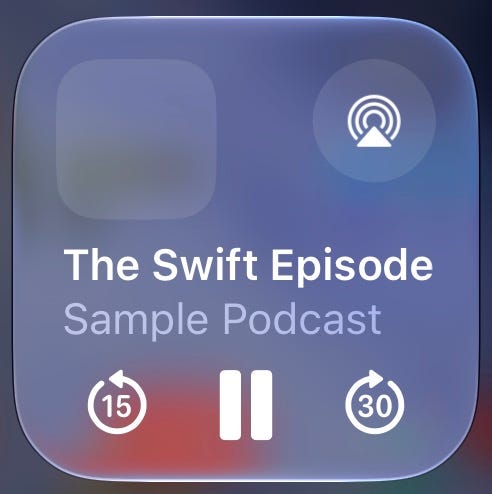
Once this data is provided, on Locked Screen or Command Center you will see the video info and enabled controls:
Commands Live Next to the State
Commands are also part of the representation:
var commands: [MediaCommand] {
    [
        .play { self.play() },
        .pause { self.pause() },
        .skipBackward(preferredIntervals: [15]) { interval in
            self.skip(by: -interval)
        },
        .skipForward(preferredIntervals: [30]) { interval in
            self.skip(by: interval)
        },
        .seekToPosition { position in
            self.seek(to: position)
        }
    ]
}
Each command is a closure the system invokes when someone interacts with Now Playing on the Lock Screen, Control Center, CarPlay, or another supported surface. The list is also dynamic: enabled(_:) can make commands unavailable as your playback state changes.
The playback methods use the observed elapsed time and clamp seeks to the episode duration:
func play() {
    if elapsedTime >= episode.duration {
        seek(to: 0)
    }
    player.play()
    isPlaying = true
}

func pause() {
    player.pause()
    isPlaying = false
}

func seek(to position: TimeInterval) {
    let clamped = min(max(position, 0), episode.duration)
    elapsedTime = clamped
    player.seek(
        to: CMTime(seconds: clamped, preferredTimescale: 600)
    )
}

func skip(by interval: TimeInterval) {
    seek(to: elapsedTime + interval)
}
This is the part I like most about the API. Remote controls are no longer a second command system that has to be wired to the player separately. They are capabilities declared by the same observable representation.
Publishing the Session
Conforming to MediaSessionRepresentable is not enough. Create a MediaSession and make it the application’s primary session:
func activate() async throws {
    let audioSession = AVAudioSession.sharedInstance()
    try audioSession.setCategory(.playback, mode: .default)
    try audioSession.setActive(true)

    let mediaSession = MediaSession(self)
    session = mediaSession
    try await mediaSession.requestToBecomeApplicationPrimary()
}

func deactivate() {
    pause()
    session = nil
    try? AVAudioSession.sharedInstance().setActive(
        false,
        options: .notifyOthersOnDeactivation
    )
}
An app can own multiple media sessions—for example, separate music and podcast players—but only one is application-primary at a time. There is also requestToBecomeSystemPrimary(), which asks to make the session the active system session and must be called while the app is in the foreground.
When playback is finished, releasing the MediaSession removes it from the system.
Don’t Mix the Old and New APIs
This migration detail deserves its own section. Apple explicitly warns against using the new local Now Playing sessions together with MPNowPlayingInfoCenter or MPRemoteCommandCenter. The result is undefined behavior.
So this should be treated as a replacement boundary, not an incremental layer where you publish half of the state through Media Player and half through Now Playing.
For an existing app, I would keep the actual playback engine untouched and replace the system-integration layer around it.
Remote Playback Is the Bigger Addition
Local sessions are a much cleaner version of a problem iOS apps could already solve. Remote sessions are more interesting.
A RemoteMediaSessionRepresentable can describe media that is actually playing on an external speaker, streaming stick, or TV. The integration lives in an app extension, and the remote state can be updated through push notifications even when the main app is not running. Commands from the system UI are routed back through that extension to your service or device.
That means a third-party smart speaker can have its playback represented on the iPhone Lock Screen and Control Center without pretending that the audio is playing locally.
For apps that only play audio on the iPhone, you can ignore this entire side of the framework. For apps controlling external playback hardware, it is probably the most important part of Now Playing.
One Model, Multiple System Surfaces
The real improvement is not fewer lines of code. It is ownership.
With the old approach, the app pushed metadata into one API, registered command handlers in another, and kept both synchronized with the actual player. Now Playing makes the player representation observable and lets the system consume it.
Change the episode and content changes. Pause playback and playbackSnapshot changes. Reach the end of a queue and a command can become disabled. The system follows the model instead of requiring another manually maintained copy of it.
For media apps, that is a much better direction.
Complete Project
The complete SwiftUI podcast player is available as a public Gist: PodcastDemoApp.swift — Complete Project.
The sample uses iOS 27 availability annotations, main-actor conformance, playback time and completion observers, and a bundled 55-second audio track. Add sample-55s.mp3 below (or any file you like) to the app target’s resources.
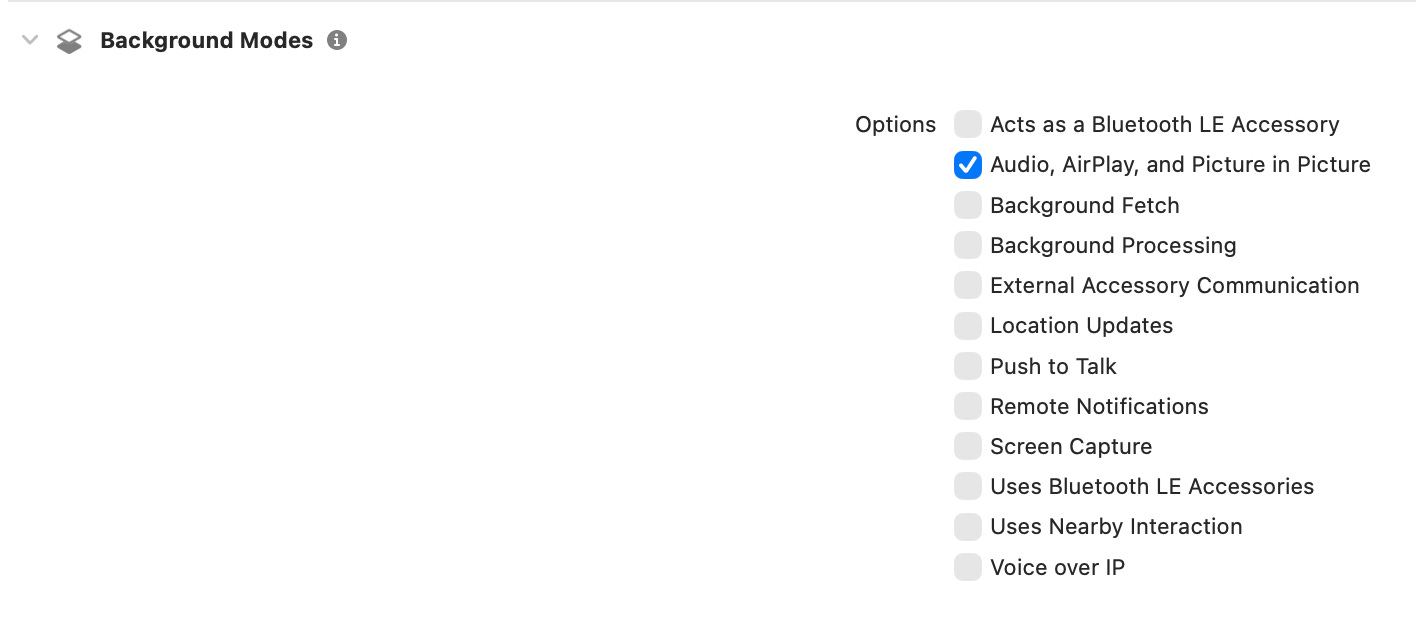
To keep audio playing while the app is in the background or the device is locked, enable Background Modes → Audio, AirPlay, and Picture in Picture in Xcode under Signing & Capabilities. This enables UIBackgroundModeswith the audio value. Configuring AVAudioSession with .playback alone does not enable background audio.
Happy coding!
References
Apple Developer Documentation: Now Playing
Apple Developer Documentation: Publishing media sessions
Apple Developer Documentation: MediaSessionRepresentable
Apple Developer Documentation: MediaSession
Apple Developer Documentation: Publishing remote media sessions
WWDC26: Meet the Now Playing framework
The part that appeals to me is having the app controls and Lock Screen commands reach the same player methods. That should mean fewer places to keep in sync after a pause or seek.