

Virtualization on macOS has supported disk images for years, but there has always been one awkward part of the story: the simplest disk format is also the least interesting one.
A raw 100 GB virtual disk is conceptually easy. Block zero in the VM maps to block zero in the file, block one maps to block one, and so on. That simplicity makes RAW widely compatible, but it also means a logically huge disk can become a physically huge file. Snapshots are expensive because copying the disk means copying the disk.
macOS 27 introduces DiskImageKit, a new framework for creating, opening, resizing, and stacking disk images. It supports traditional RAW images, but the interesting part is Apple’s Sparse Image Format — ASIF — and the ability to build a logical disk from several layers.
That changes VM storage architecture quite a bit. Instead of cloning an entire base disk for every virtual machine, several machines can share one read-only base while each VM stores only its own changes in an overlay. If the base lives on slow storage, a cache layer can sit above it and keep frequently read blocks locally.
The framework is clearly designed around Virtualization, but the useful concept isn’t “another way to create a file.” It is copy-on-write disk composition as a first-class Swift API.
DiskImageKit is a beta framework in macOS 27. API details can still change before the final release. Warning you once again.
A VM Snapshot Manager
Let’s build a small utility instead of walking every configuration type from Apple’s docs.
Imagine a macOS Virtualization app that creates disposable development VMs. Every VM starts from the same clean macOS or Linux disk. Developers can experiment, install software, break things, and then reset the VM without copying tens of gigabytes every time.
The storage model we want looks like this:
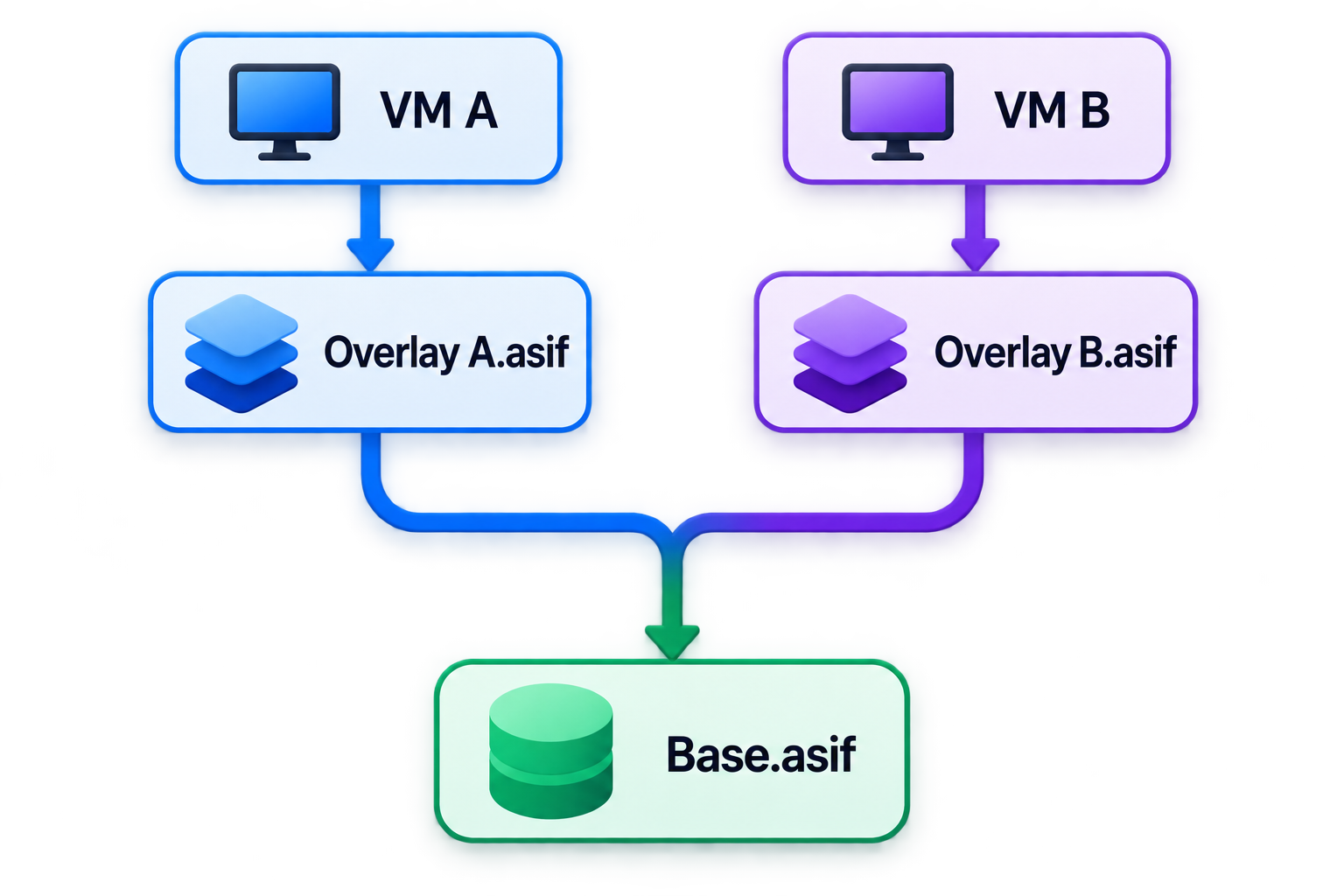
The base image is shared and read-only. Each VM writes only to its own overlay.
We’ll build a small DiskImageKitSnapshotManager that can:
create a reusable ASIF base image;
create a per-VM overlay;
open the base and overlay as a stacked disk;
reset a VM by replacing only its overlay;
optionally add a cache layer for a base image stored on slower storage.
Importing DiskImageKit
The framework is available on macOS 27.
And at the moment of writing - macOS 27 Golden Gate is in Beta. So either use it or wait for a couple of weeks to het a September’s GM.
import DiskImageKitThe main types we’ll use are:
DiskImageStackedImageDiskImage.CreationConfigurationDiskImage.OpenConfigurationStackedImage.CreateStorageStackedImage.OpenStorage
A DiskImage represents one image file. A StackedImage represents several compatible images combined into one logical block device.
Creating the Base Image
Let’s start with a reusable 80 GB base disk.
import Foundation
import DiskImageKit

@available(macOS 27.0, *)
final class DiskImageKitSnapshotManager {

    enum SnapshotError: Error {
        case missingBaseImage
    }

    let baseURL: URL
    let overlaysDirectory: URL

    init(baseURL: URL, overlaysDirectory: URL) {
        self.baseURL = baseURL
        self.overlaysDirectory = overlaysDirectory
    }

    func createBaseImageIfNeeded(
        size: UInt64 = 80 * 1024 * 1024 * 1024
    ) async throws {
        guard !FileManager.default.fileExists(atPath: baseURL.path) else {
            return
        }

        let configuration = DiskImage.CreationConfiguration(
            url: baseURL,
            format: .asif,
            size: size
        )

        _ = try await DiskImage(creating: configuration)
    }
}
The important part is the format:
format: .asifASIF is sparse. A logical 80 GB disk doesn’t need to occupy 80 GB on the host immediately. The image grows as blocks are written.
That makes it a much better base for disposable VMs than a fully allocated RAW image.
ASIF vs RAW
DiskImageKit currently exposes two formats:
DiskImage.Format.asif
DiskImage.Format.raw
RAW is the classic representation:
Logical block 0 → File block 0
Logical block 1 → File block 1
Logical block 2 → File block 2
It is simple and broadly compatible, but the file can grow to the full logical disk size.
ASIF adds metadata that tracks which logical blocks actually have physical storage behind them.
Conceptually:
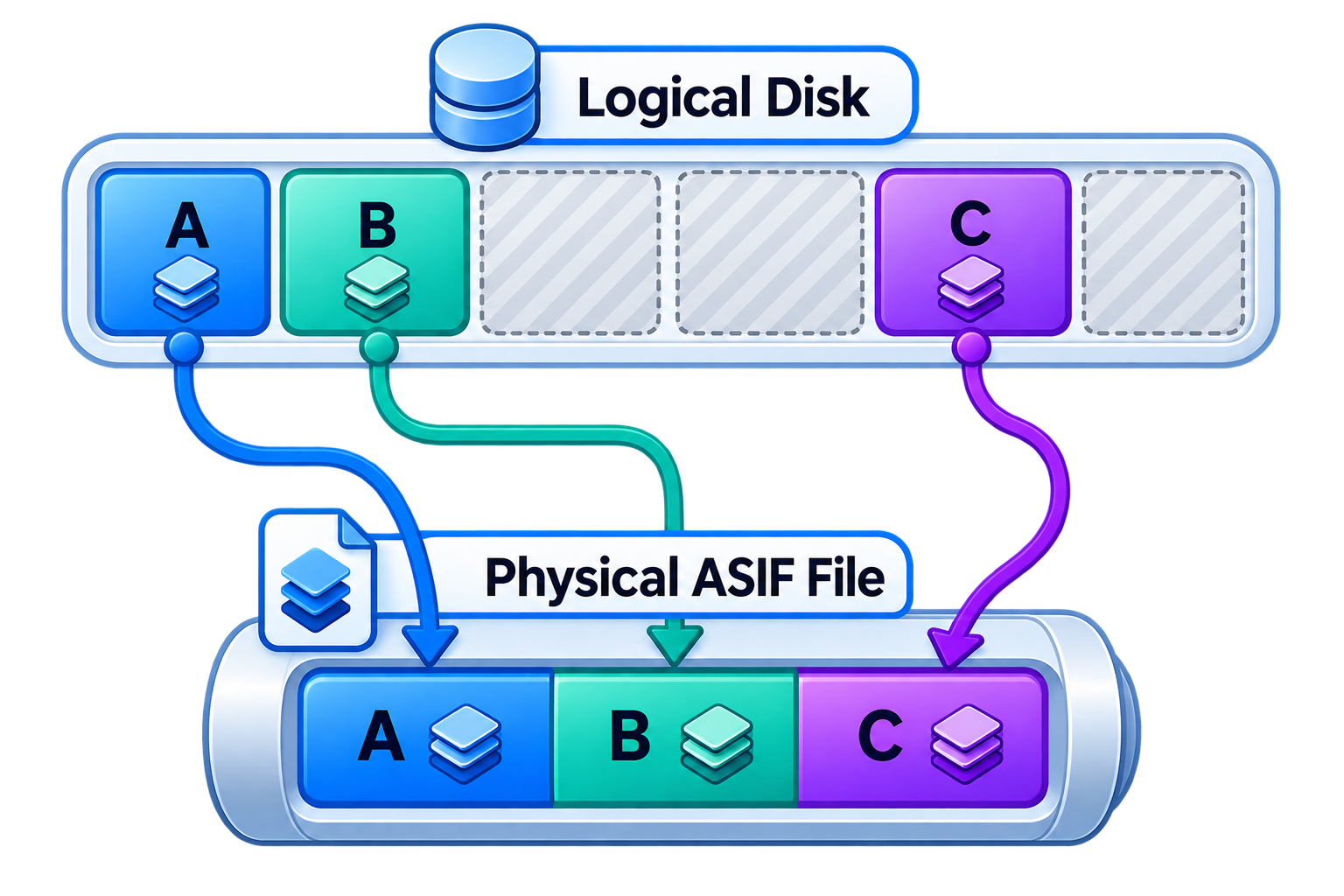
Unwritten regions don’t need physical backing yet.
The exact on-disk layout is an implementation detail, but the practical result is simple: logical capacity and physical file size are no longer the same thing.
Creating a VM Overlay
Now we need a writable layer for each VM.
The base should stay unchanged. VM-specific writes go into an overlay.
@available(macOS 27.0, *)
extension DiskImageKitSnapshotManager {

    func overlayURL(for vmID: String) -> URL {
        overlaysDirectory
            .appendingPathComponent(vmID)
            .appendingPathExtension("asif")
    }

    func createOverlay(for vmID: String) async throws -> URL {
        guard FileManager.default.fileExists(atPath: baseURL.path) else {
            throw SnapshotError.missingBaseImage
        }

        try FileManager.default.createDirectory(
            at: overlaysDirectory,
            withIntermediateDirectories: true
        )

        let overlayURL = overlayURL(for: vmID)

        if FileManager.default.fileExists(atPath: overlayURL.path) {
            return overlayURL
        }

        let base = try await DiskImage(
            opening: .init(
                url: baseURL,
                mode: .readOnly
            )
        )

        let overlayStorage = StackedImage.CreateStorage(
            url: overlayURL,
            size: base.size
        )

        let configuration = StackedImage.CreationConfiguration(
            baseImage: base,
            overlay: overlayStorage
        )

        _ = try await StackedImage(creating: configuration)

        return overlayURL
    }
}
The overlay has the same logical size as the base, but it only needs to store blocks that differ from the base.
So if the guest modifies 2 GB worth of blocks, the overlay can remain close to that amount instead of becoming another 80 GB copy.
Opening the VM Disk
Once the base and overlay exist, we can combine them into a StackedImage.
@available(macOS 27.0, *)
extension DiskImageKitSnapshotManager {

    func openVMImage(for vmID: String) async throws -> StackedImage {
        let overlayURL = try await createOverlay(for: vmID)

        let base = try await DiskImage(
            opening: .init(
                url: baseURL,
                mode: .readOnly
            )
        )

        let overlay = StackedImage.OpenStorage(
            url: overlayURL,
            mode: .readWrite
        )

        let configuration = StackedImage.OpenConfiguration(
            baseImage: base,
            overlay: overlay
        )

        return try await StackedImage(opening: configuration)
    }
}
The guest sees one disk.
DiskImageKit decides which layer provides each block.
Conceptually:
Read block 120
      │
      ▼
┌───────────────┐
│ Overlay       │ ── contains block? ── yes ──▶ return overlay block
└───────┬───────┘
        │ no
        ▼
┌───────────────┐
│ Base          │ ─────────────────────────────▶ return base block
└───────────────┘
or as diagram:
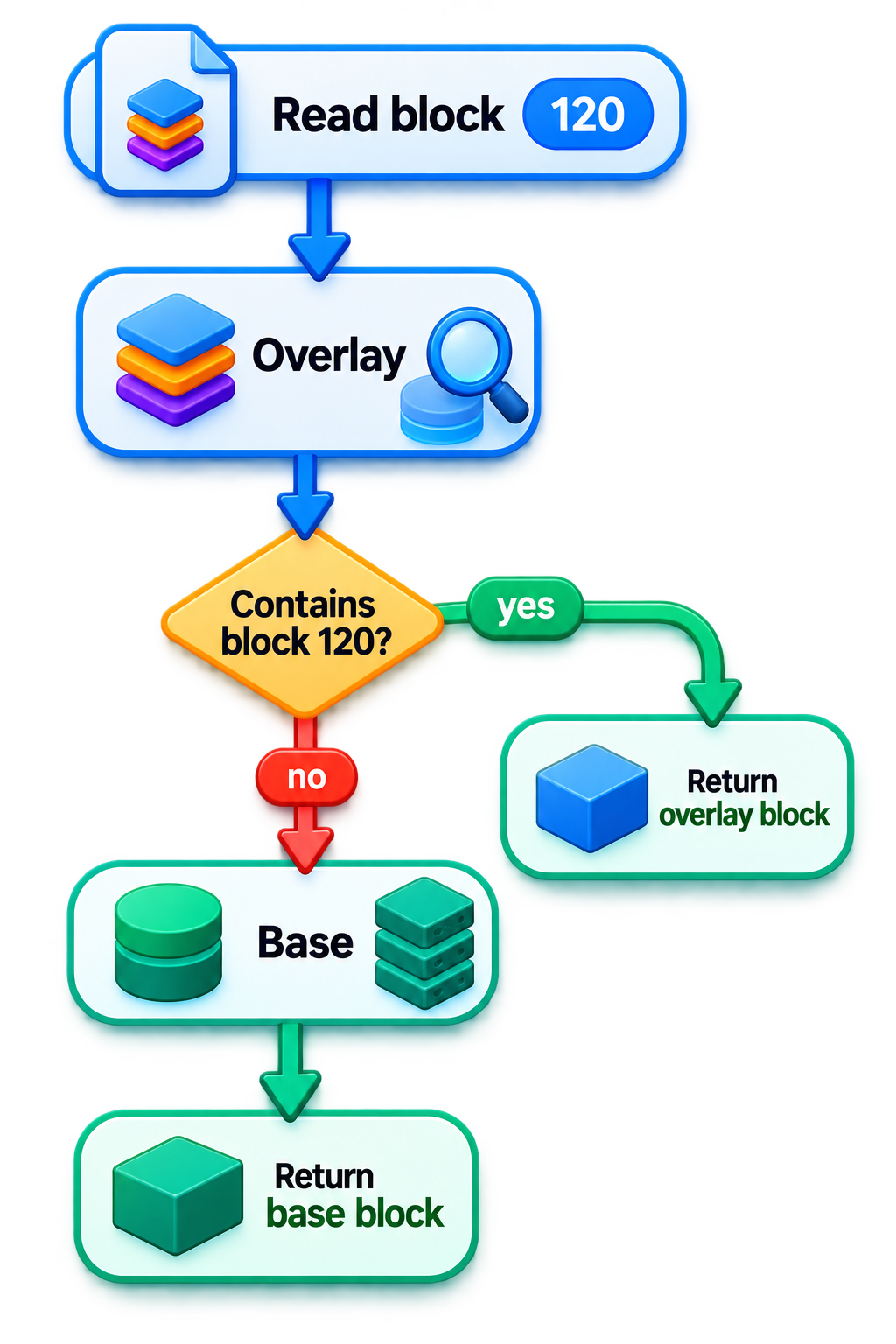
Writes go to the overlay.
Write block 120
      │
      ▼
┌───────────────┐
│ Overlay       │ ◀── write new block
└───────────────┘

Base remains unchanged
That’s the core snapshot model.
Resetting a VM
The nice part of this architecture is reset.
To restore a VM to its clean base state, we don’t need to copy the base again. We only replace the overlay.
@available(macOS 27.0, *)
extension DiskImageKitSnapshotManager {

    func resetVM(_ vmID: String) async throws {
        let overlayURL = overlayURL(for: vmID)

        if FileManager.default.fileExists(atPath: overlayURL.path) {
            try FileManager.default.removeItem(at: overlayURL)
        }

        _ = try await createOverlay(for: vmID)
    }
}
The workflow becomes:
Base.asif
   │
   ├── Overlay A.asif   ← VM A changes
   ├── Overlay B.asif   ← VM B changes
   └── Overlay C.asif   ← VM C changes
Reset VM B:
Delete Overlay B.asif
Create new empty Overlay B.asif
The base never moves.
This is especially useful for CI workers, development sandboxes, or test environments where VMs are frequently thrown away and recreated.
Adding a Cache Layer
Overlay and cache layers are not the same thing.
An overlay stores writes that differ from the base.
A cache stores blocks read from a slower lower layer so future reads can be served from faster storage.
Imagine the base image is on external or network storage:
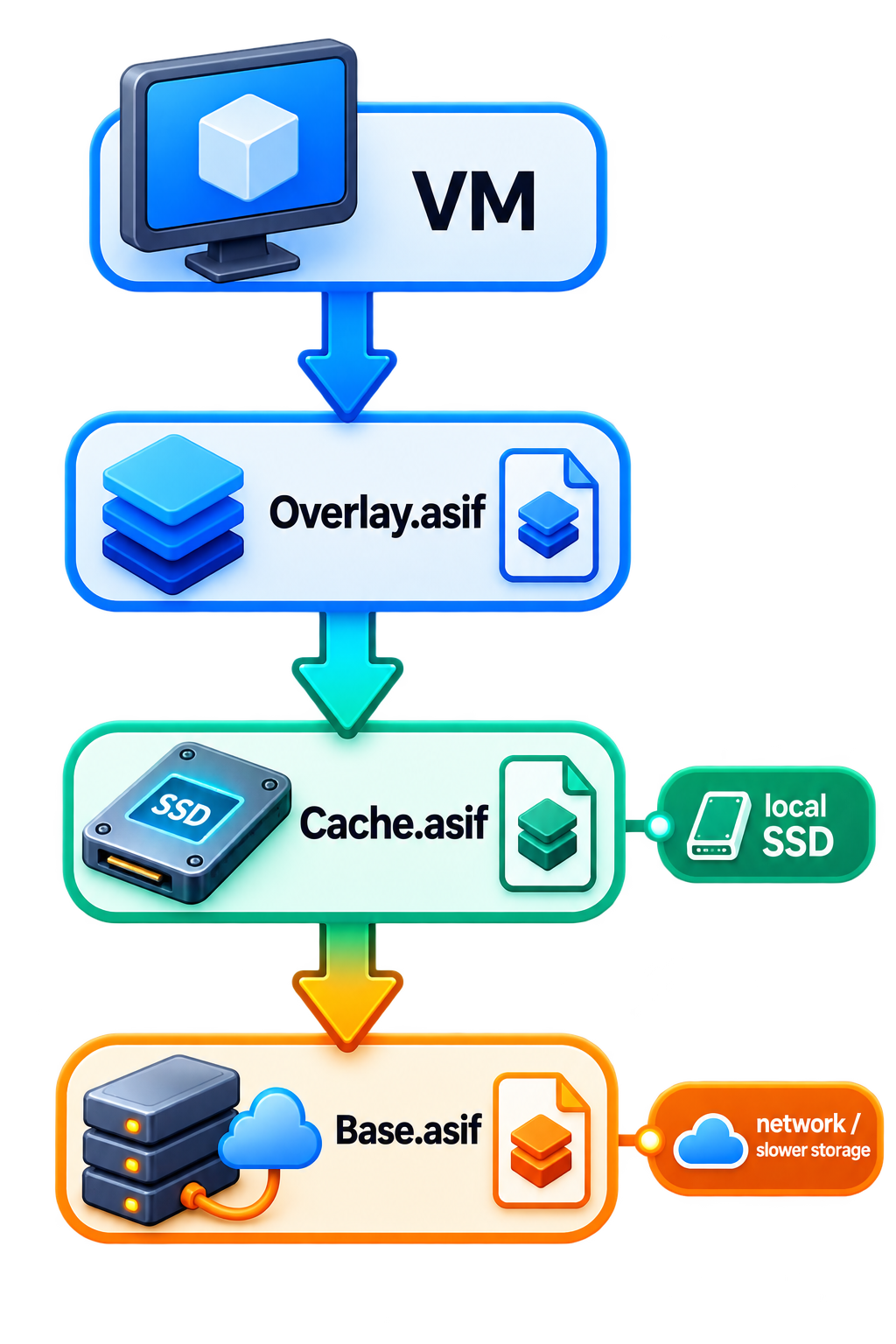
DiskImageKit lets us describe that stack too.
@available(macOS 27.0, *)
extension DiskImageKitSnapshotManager {

    func openVMImageWithCache(
        for vmID: String,
        cacheURL: URL
    ) async throws -> StackedImage {
        let overlayURL = try await createOverlay(for: vmID)

        let base = try await DiskImage(
            opening: .init(
                url: baseURL,
                mode: .readOnly
            )
        )

        let cache = StackedImage.OpenStorage(
            url: cacheURL,
            mode: .readWrite
        )

        let overlay = StackedImage.OpenStorage(
            url: overlayURL,
            mode: .readWrite
        )

        let configuration = StackedImage.OpenConfiguration(
            baseImage: base,
            cache: cache,
            overlay: overlay
        )

        return try await StackedImage(opening: configuration)
    }
}
Now frequently read base blocks can be served from the cache while VM writes still remain isolated in the overlay.
Creating the Cache
A cache is also an ASIF layer.
@available(macOS 27.0, *)
extension DiskImageKitSnapshotManager {

    func createCacheIfNeeded(at cacheURL: URL) async throws {
        guard !FileManager.default.fileExists(atPath: cacheURL.path) else {
            return
        }

        let base = try await DiskImage(
            opening: .init(
                url: baseURL,
                mode: .readOnly
            )
        )

        let cacheStorage = StackedImage.CreateStorage(
            url: cacheURL,
            size: base.size
        )

        let configuration = StackedImage.CreationConfiguration(
            baseImage: base,
            cache: cacheStorage
        )

        _ = try await StackedImage(creating: configuration)
    }
}
A cache is useful when the lower image is expensive to read repeatedly.
It isn’t a snapshot by itself. It’s a performance layer.
Resizing a Disk Image
DiskImageKit also supports resizing.
let image = try await DiskImage(
    opening: .init(
        url: imageURL,
        mode: .readWrite
    )
)

try await image.resize(to: newSize)
This changes the logical size of the disk image.
That doesn’t automatically resize the filesystem inside the guest. The VM still needs to expand its partition or filesystem separately.
Think of it as increasing the size of the physical disk, not magically resizing APFS, ext4, or another filesystem living inside it.
Inspecting the Image
Both DiskImage and StackedImage expose useful properties.
For a DiskImage:
let image = try await DiskImage(
    opening: .init(
        url: baseURL,
        mode: .readOnly
    )
)

print(image.format)
print(image.size)
print(image.blockSize)
For a stacked image:
let stacked = try await openVMImage(for: "development")

print(stacked.size)
print(stacked.blockSize)
That makes it easy to validate compatibility before attaching an image to a VM.
Using It with Virtualization
DiskImageKit itself manages disk images. The Virtualization framework still manages the virtual machine.
The final integration point is the image’s file handle.
let stackedImage = try await manager.openVMImage(
    for: "development"
)

let attachment = try VZDiskImageStorageDeviceAttachment(
    fileHandle: stackedImage.fileHandle,
    readOnly: false
)
Then attach it to a virtual storage device configuration as usual.
The important change is that the VM no longer needs to know whether its disk is:
one RAW file;
one ASIF file;
a base plus overlay;
a base plus cache plus overlay.
It receives one block device.
A Small SwiftUI Inspector
To make the sample easier to experiment with, here’s a tiny SwiftUI view that creates a VM overlay and shows the resulting disk information.
Again - you will need macOS 27 Golden Gate. Beta or GM in future.
Where It Fits
DiskImageKit is clearly specialized, but if you’re building Virtualization tooling, the workflows are immediately useful:
local VM managers;
disposable development environments;
CI VM runners;
snapshot systems;
golden-image workflows;
VMs backed by network storage;
labs where many machines share the same base installation.
I wouldn’t use DiskImageKit as a replacement for normal app document storage. This is a block-device framework aimed primarily at Virtualization.
The interesting use case is when one logical virtual disk should not mean one giant independent file.
Limitations
A few things I would keep in mind:
DiskImageKit is new in macOS 27
The framework is currently beta
Supported formats are ASIF and RAW
Upper stack layers are ASIF
Cache and overlay layers solve different problems
Logical disk size isn’t the same as physical ASIF file size
Resizing the image doesn’t automatically resize the guest filesystem
Existing layers must be compatible with the stack
Encrypted disk images aren’t supported by the current open API
The framework is designed primarily for Virtualization rather than generic file storage
DiskImageKit’s API surface is quite small. The bigger change is architectural: sparse disks, copy-on-write overlays, caches, and shared bases are now normal Swift objects instead of something every VM app has to engineer around itself.
References
Apple Documentation: DiskImageKit
Apple Documentation: DiskImage
Apple Documentation: StackedImage
Apple Documentation: DiskImage.CreationConfiguration
Apple Documentation: DiskImage.Format
Apple Documentation: init(creating:)
Apple Documentation: init(opening:)
Apple Video: Expand the capabilities of your Virtualization app