
Swift Bits: Git Worktree
Branching the modern way

It’s funny how a tiny CLI command can shift your entire development workflow. For years I was stuck in the same pattern: git stash, git checkout, git stash pop, repeat and branching. Then I worked a lot with the ChatGPT macOS app and its connectors. Next, the Codex macOS app came along and, along with the Skills tab, there was a picker for the task run destination. Bottom bar is very informative:
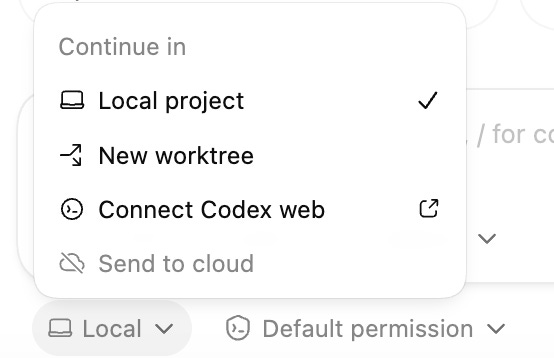
You can see a “New worktree“ and that attracted my attention. But that was not the first time I had used it. I just didn’t know about it.
Claude app also use it for parallel session:
Work in parallel with sessions
Click + New session in the sidebar to work on multiple tasks in parallel. For Git repositories, each session gets its own isolated copy of your project using worktrees, so changes in one session don’t affect another until you commit them. Worktrees are stored in
~/.claude-worktrees/by default.
Docs
And that’s why worktrees are hitting the spotlight lately because AI-powered tools (like Conductor) and AI coding assistants: increasingly rely on running parallel workflows. And worktrees are the unsung hero that make those workflows fast and sane.
What Is Git Worktree, Really?
Imagine this: you could check out multiple branches of the same repo at the same time without cloning, without stashing, and without jumping between contexts.
That’s exactly what Git Worktrees let you do. Technically, worktrees create separate working directories that are all linked back to the same .git repository. You can have one directory on main, another on feature/foo, and another on hotfix/bar, all open at once. Each has its own working set of files, but they share the same Git history and object database — so commits, tags, and branches stay in sync without duplication.
It’s not magic! It’s Git’s native way of handling multiple working copies without wasting space. If you’ve ever cloned the same repo three times just to manage multitasking, consider this your apology from the universe.
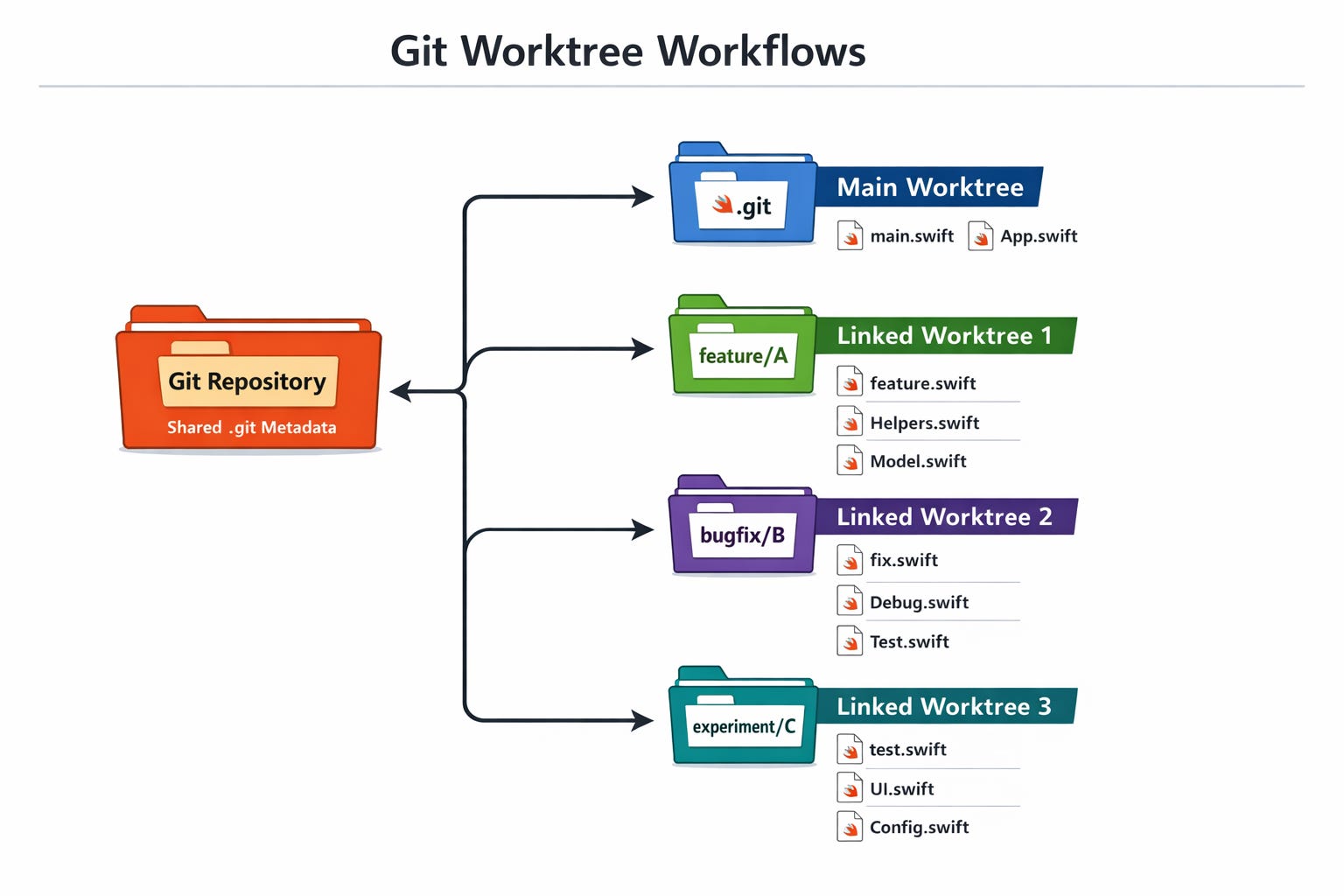
This approach also solve the old merging problem when you need to commit fast to the feature branch to jump back to main/master. Just make a worktree from the problematic branch and keep working.
Also, you might now that we can’t have multiple branches for a repo. Well, seems that we can do that. Not sure why you might need it? Next section will tell you more.
How You Can Use It (Beyond “Just Another Git Trick”)
At first glance, worktrees are an efficiency hack for the multitasker. But their real superpower emerges in two increasingly common workflows:
🛠 Parallel Feature Development
Instead of constantly switching context, you can open separate features in separate worktrees. Want to build a UI component in one and debug an urgent bug in another? Done.
Our multiple branches issues from above
🤖 AI-Powered Development
With AI tools that spin up separate agents to run against your codebase (like Conductor does with parallel Claude Codes, each in its own sandboxed copy), worktrees make it possible to do this locally without cloning or spinning up separate VMs. Essentially, each agent gets a dedicated branch + working copy — without you having to manage massive clones.
This paradigm is quickly becoming the backbone of AI-augmented workflows: by avoiding stash chaos and enabling isolated contexts, worktrees let you let the machines do their thing without disrupting your flow.
A Simple Worktree Example: Create & Remove
Here’s the minimal set of commands you actually need. Think of these as your “git worktree starter pack”.
Create a Worktree for a Feature
# Create a new worktree for a feature branch
git worktree add ../feature-awesome -b feature/awesome
What this does:
Makes a new folder ../feature-awesome
Creates and checks out feature/awesome there
Links it back to your central .git repository
No stashing, no switching — everything stays in your current directory.
When You’re Done: Remove It
git worktree remove ../feature-awesomeBoom — worktree gone. Git cleans up references, and the branch stays in your repo just like any other.
💡If you are keen to working with IDEs: Codex app have an task location picker at the bottom bar and Claude have a “New Session“ which will all too use Worktree as we know now.
Final Thoughts
Git Worktree feels like one of those features that should have existed all along. It solves a real pain point: context switching chaos. And now that AI tools and agent managers are building their workflows on top of it, it’s fast becoming a tooling standard.
If you’re still in the mindset of git stash → git checkout → git stash pop, give Git Worktree a try. Your future self (and your future AI tools) will thank you.
Happy branching 🚀!
I would like to see a comparison of GUI Git clients, including European clients such as Fork and GitFox (https://substack.com/@blazeswift/note/c-197519442?r=5g1i2c&utm_source=notes-share-action&utm_medium=web), and their support for working trees.
Another topic would be which parts of Git are already integrated into AI tools like Claude and Codex.