
SwiftUI: Text Color & Concatenation
Apply colors to your Text easily

The Text view is an essential part of the SwiftUI framework. It’s hard to imagine a clearer representation of data than plain text. Simple at first glance, the most complex tasks are often the ones with the shortest descriptions. That’s why even in a live-coding interview, the Text view can shine from a new angle. "Shining" is not an abstract term here.
Recently, one such session I was asked a specific feature:
Given a paragraph of solid text. Need to add a gradient to the first word and then animate it. Imagine, no Claude, ChatGPT, Cursor available.
Sounds like a challenge and an interesting one. Let’s start from the basic styling.
Available Styling
We have a modest but satisfying list of view modifiers for Text:
font/fontWeight/fontDesign/fontWidthbold/italic/strikethrough/underlinemonospaced/monospacedDigitkerning/tracking/baselineOffsetAnd our old friend from the start,
foregroundColor
ForegroundColor
Capable to work starting from iOS 13 till iOS 26. Here is a short-list of main feature:
Purpose: Applies a solid
Colorto the view's foreground, such as the text color inTextviews. This is the classic, straightforward way to change text color.Deprecation Status: In modern SwiftUI versions,
foregroundColor(_:)has become outdated. The recommended replacement is the more flexibleforegroundStyle(_:), which supports not only solid colors but also gradients, materials, and hierarchical styling.Limitations: accepts only
Colorstruct
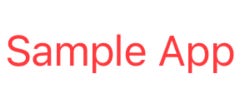
.foregroundColor(.red)ForegroundStyle
Was introduced in SwiftUI for iOS 15, macOS 12, tvOS 15, and watchOS 8 (WWDC 2021) and now accepts a ShapeStyle. This brings a much wider styling abilities than before.
Multiple structures conforms to ShapeStyle. The list is interesting and provides an interesting effects now.
Solid Colors
Color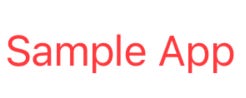
.foregroundStyle(.red)
Materials (iOS 15+, macOS 12+)
MaterialPredefined materials like
.ultraThinMaterial,.thinMaterial,.regularMaterial,.thickMaterial,.ultraThickMaterial.
Gradients
LinearGradientRadialGradientAngularGradientEllipticalGradient(iOS 17+, macOS 14+)
Assume that we have:
let rainbowColors = [Color.red, Color.orange, Color.yellow, Color.green, Color.blue, Color.indigo, Color.purple]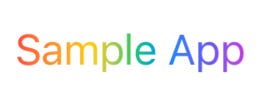
Image-Based
ImagePaint
This a cool shape style that fills a shape by repeating a region of an image.
I’ve found this nice image:
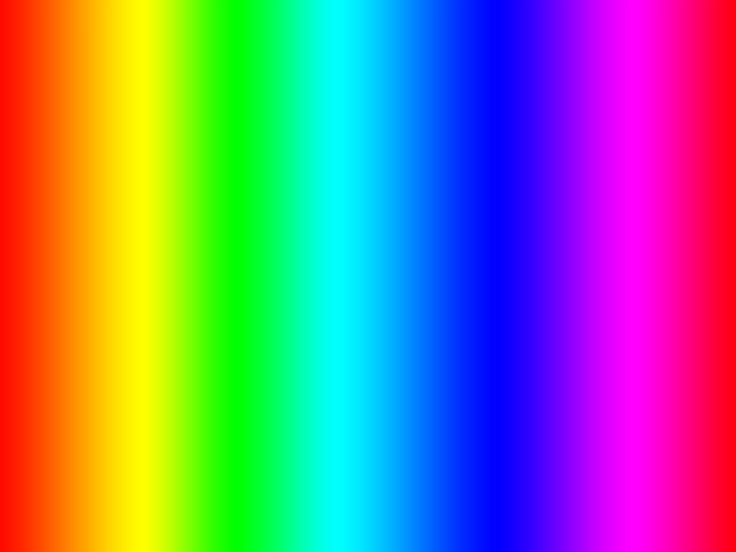
And set it with some scale because we need to either set a source rect of an image or set the scale:

Text("Sample App")
   .foregroundStyle(ImagePaint(image: Image("rainbow"), scale: 0.5))
Hierarchical Styles (iOS 15+, macOS 12+)
HierarchicalShapeStyle(e.g..primary,.secondary,.tertiary,.quaternary)
Let’s embed some Texts into HStack:

HStack {
    Text("Sample App")
        .foregroundStyle(.primary)

    Text("Sample App")
        .foregroundStyle(.secondary)

    Text("Sample App")
        .foregroundStyle(.tertiary)
}
.foregroundStyle(.cyan)
Parent style sets the main content style and child styles are applying the levels.
Separation/Foreground/Background Styles
SeparatorShapeStyleForegroundStyleBackgroundStyle
There is another way to set a color: AttributedString and we will highlight in below.
Concatenation
Now it’s time to merge texts! In real-life apps, we often work with solid paragraphs and multiline text. However, what if we need to merge multiple sources but show them as a single piece? Let’s dive into possible solutions.
Text + Text
+(_:_:) operator was a first solution till deprecation in iOS 26. Still working and has a small caveat.
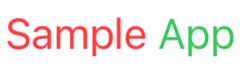
Text("Sample ").foregroundStyle(.red)
+ Text("App").foregroundStyle(.green)
The problem is that the left and right elements must be of type Text. As soon as we apply a modifier that erases the type (like many non-Text modifiers), an error will appear:
Cannot convert value of type 'some View' to expected argument type 'Text'
This mean that staged animation is not possible with this approach.
Attributed Strings
We can declare 2 Attributed String with different colors:

var message1: AttributedString {
    var result = AttributedString("Sample ")
    result.foregroundColor = .red
    return result
}

var message2: AttributedString {
    var result = AttributedString("App")
    result.foregroundColor = .green
    return result
}

Text(message1 + message2)
Hm… What about gradient? AttributedString accepts solid colors only. Gradient can be added to the whole View (

Text(message1 + message2)
    .overlay(
        LinearGradient(
            colors: rainbowColors,
            startPoint: .leading,
            endPoint: .trailing
        )
    )
    .mask(Text(message1 + message2))
This is great but this is not what we want exactly. Let’s get close to the original assessment now.
Since +(_:_:) (I really like how it looks) operator is deprecated, Apple suggested a new way to join texts. Let’s open the warning:
Deprecated
Use string interpolation on `Text` instead: `Text(\"Hello \(name)\")`
Alright, let’s do it as suggested.
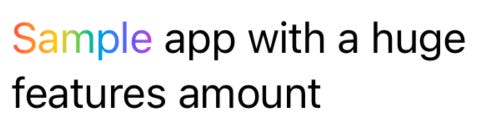
Text("Sample \(Text("app with a huge\nfeatures amount").foregroundStyle(.black))")
    .foregroundStyle(
        LinearGradient(
            colors: rainbowColors,
            startPoint: .leading,
            endPoint: .trailing
        )
    )
Amazing, isn’t it? Now let’s add animation. Fortunately, the string interpolation init allows us to implement it.
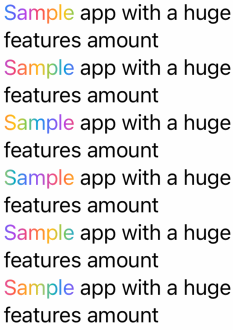
Text("Sample \(Text("app with a huge\nfeatures amount").foregroundStyle(.black))")
                    .phaseAnimator(0...rainbowColors.count)
                     { view, phase in
                        view.foregroundStyle(
                            LinearGradient(
                                colors: shiftedColors(rainbowColors,
                                        by:   phase),
                                startPoint: .leading,
                                endPoint: .trailing
                            )

                        )
                    }
If you want to tweak the animation - then simply add to phaseAnimator:
animation: { phase in
    .linear(duration: 2.0)
}
All done, and we can mark it as complete ✅.
Great article. But I can’t get my head why I can’t use this technique with other views.
Text("hello \(Text("world").foregroundStyle(.blue)) \(Image(systemName: "diamond"))").foregroundStyle(.red) // ✅
Image(systemName: "diamond")
.foregroundStyle(.green) ✅
Text("hello \(Text("world").foregroundStyle(.blue)) \(Image(systemName: "diamond").foregroundStyle(.green))") ❌